
The Creator Essentials: What You Actually Need vs. What You Want (and What You Can Skip)

Updated: 12 hours ago
Building a creator setup doesn't have to mean spending a fortune. Here's where I'd start. I've built a side-by-side short list of two essential options, from simple to extreme, from similar to practical.
Affiliate disclosure: This article contains paid affiliate links. I may earn a commission if you purchase through them, at no additional cost to you. As an Amazon Associate I earn from qualifying purchases. #ad #CommissionEarned
When I think about the equipment I've collected throughout the years and/or my journey as a creator, there's one thing I wish more people understood: having more gear doesn't necessarily make you a better creator. It's easy to convince yourself that the next camera, microphone, light, or accessory is the missing piece. Sometimes an upgrade genuinely helps, but you have to start somewhere and that can go a long way.
Whether you're starting a YouTube channel, making videos for Instagram, building a personal brand, or documenting your travels, there are a few essentials that can make creating content easier.
Here are the ones I would prioritize.

1. A Good Microphone: Because People Need to Hear You
You can get away with a "bad video". Bad audio is much harder to ignore. A compact microphone can make a noticeable difference whether you're recording at home, outdoors, or on the go.
What I'd look for: clear voice recording, compatibility with your camera or phone, and a setup that's easy to use. Both of these offer great results nevertheless.
Amazon Audio-Technica shotgun recommendation: [ https://link.amazon/B07ucbwFM ] (paid link)
Amazon DJI Mic Mini recommendation: [ https://link.amazon/B0exNyio0 ] (paid link)

2. A Reliable Tripod: Your Extra Pair of Hands
A good tripod lets you record yourself without constantly asking someone else for help. For solo creators, that's a big deal. I would prioritize something lightweight, portable, and sturdy enough for your equipment. Tripods are way underrated.
Amazon Neewer flexible tripod recommendation: [ https://link.amazon/B06kLUOA9 ] (paid link)
Amazon SmallRig heavy duty tripod recommendation: [ https://link.amazon/B08ibiwZQ ] (paid link)

3. A Portable Light: Better Lighting Without a Studio
Before spending money on a more expensive camera, consider improving your lighting.
A small LED light can help with videos, photography, video calls, and content recorded indoors.The best light isn't necessarily the biggest. It's the one you'll actually use and control.
Amazon Neewer Pocket Led recommendation: [ https://link.amazon/B0iMXv1T5 ] (paid link)
Amazon SmallRig flashlight recommendation: [ https://link.amazon/B0ecxY3Wf ] (paid link)

An Action Camera: The Extra Camera Everybody Needs
You really do need three cameras in your bag: your main camera, your phone, and one that can get the weirdest angles possible. Maybe take a drop or two, or none, but action cameras offer so much than just its sturdiness.....being small opens up so many possibilities, from comfort to composition.
Amazon DJI Osmo 4 recommendation: [ https://link.amazon/B05fZAlx7 ] (paid link)
Amazon Insta360 Luna Pro recommendation: [ https://link.amazon/B0dQHySIq ] (paid link)

5. An External SSD: Create, Protect, Repeat
I know, prices for SSD's and memory cards have gone through the roof, but photos, videos, and project files accumulate quickly. External storage isn't the most exciting purchase, but it can be one of the most practical. A portable SSD helps you transfer footage and keep active projects organized. It's better to have it and don't need it, than to need it and don't have it.
Amazon Lexar 1 TB recommendation: [ https://link.amazon/B08Um0u7Q ] (paid link)
Amazon Sandisk 1 TB recommendation: [ https://link.amazon/B02BaKn9U ] (paid link)
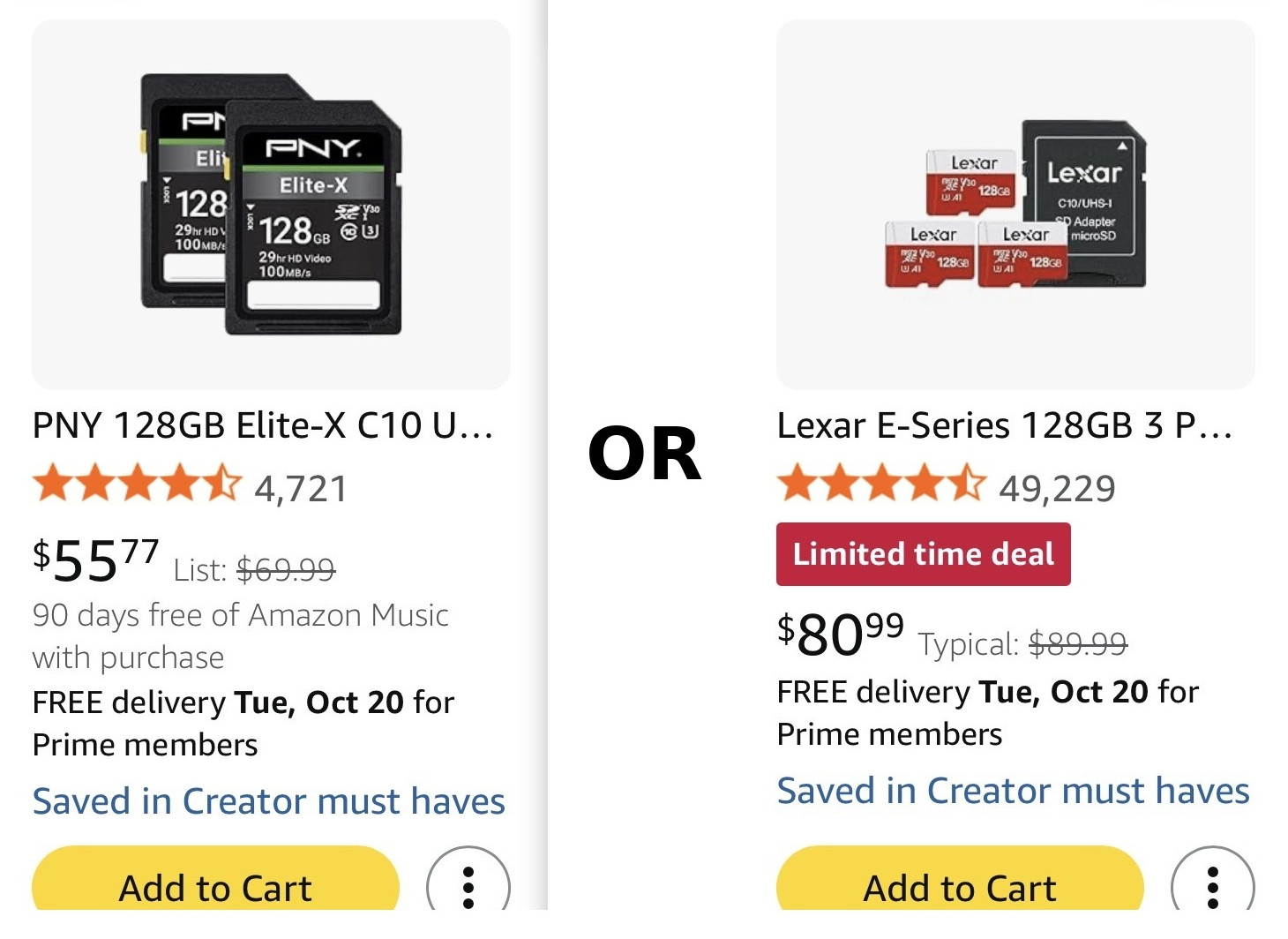
6. SD Cards: You Need Hundreds
We live in a time where we can't afford to reformat our SD cards. Memory space is so expensive that I would rather keep the content secure and buy more. But now with inflation, the prices on these are insane, that's why you should immediately buy some if they go for a good price.
Amazon PNY 128GB recommendation: [ https://link.amazon/B0bM6wcIf ] (paid link)
Amazon Lexar Micro 128GB recommendation: [ https://link.amazon/B02IHKhDo ] (paid link)

7. A Practical Creator Bag: Everything in One Place
The more often you create outside your home, the more you'll appreciate having a flexible bag. A sling bag is very practical in both, price and accesibilty, and the Nanuk is the heaviest realest bag you can find. You don't need the most expensive camera backpack. You need one that protects your equipment and fits the way you work. If you are on the go, you need something as solid as this one, and when I'm on foot, I always take my sling bag.
Amazon NANUK case recommendation: [ https://link.amazon/B09dYgObr ] (paid link)
Amazon K&F Concept recommendation: [ https://link.amazon/B0bJhto6J ] (paid link)
8. The Tools You Didn't Know You Needed: Everything in One Place
A mix of all the techy and nerdy things that fill your creator heart, pay attention to these because the price to usability ratio makes these a no-brainer.

Amazon Ulanzi cooling recommendation: [ https://link.amazon/B02dXh4nl ] (paid link)
Amazon PGYTECH reader case recommendation: [ https://link.amazon/B0iRpXSmu ] (paid link)

Amazon KOALA Clean cloth recommendation: [ https://link.amazon/B06QB17tL ] (paid link)
Amazon Apple AirTag 2nd Gen recommendation: [ https://link.amazon/B00ScQq95 ] (paid link)

Amazon SmallRig Multi Tool 10-1 recommendation: [ https://link.amazon/B03DuxAgf ] (paid link)
Amazon SmallRig Magic Arm recommendation: [ https://link.amazon/B09yOW8Iu ] (paid link)

Amazon Show Your Work book recommendation: [ https://link.amazon/B0btdEUXL ] (paid link)
Amazon DUCLUS Light Box recommendation: [ https://link.amazon/B08n2vRuW ] (paid link)

Amazon Peak Design Hand strap recommendation: [ https://link.amazon/B08S4GthR ] (paid link)
Amazon Peak Design Leash strap recommendation: [ https://link.amazon/B05iS2LSX ] (paid link)

Amazon Klik no screen Digital cam recommendation: [ https://link.amazon/B0hr7OUBq ] (paid link)
Amazon Kodak CHARMERA recommendation: [ https://link.amazon/B0gH9Wwqz ] (paid link)
What Can You Skip?
You don't need to buy everything at once. If you're just getting started, I'd prioritize audio, stability, and lighting before investing in specialized accessories.Your smartphone might already be enough to begin creating. And if you already own equipment, learn to get more out of it before replacing it.
Final Thoughts: Create First, Upgrade With Purpose
The best creator setup isn't the one with the most expensive equipment. It's the one that removes obstacles and helps you create consistently. Buy what solves a problem. Skip what doesn't.
And remember: your ideas, perspective, and willingness to create will always matter more than the equipment sitting on your desk.
Explore the recommendations above, compare what fits your needs, and build your setup one useful piece at a time. Remember that I do benefit monetarily from qualifying sales. #ad #CommissionsEarned


Comments